


Search Settings on Individual Pages
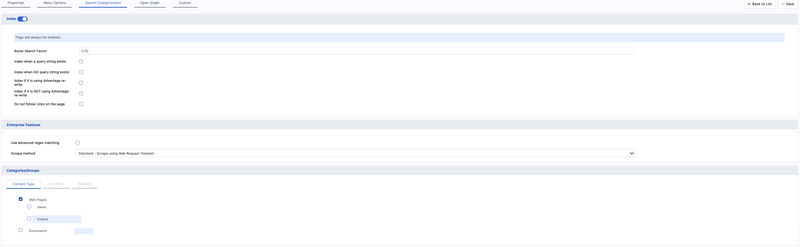
The Search configuration screen sets policy for a whole domain. Individual pages can then depart from that policy, and can be tagged so that results are filterable. Both are done in page properties, on the Search Categorization tab.
This is where most day-to-day search tuning happens once the index is working. It is content work rather than configuration work: it is done page by page, by whoever maintains the page.
How These Settings Reach the Index
The crawler does not read these settings from the database. When a page is served, BWA writes them into the page's own markup as meta tags and comment markers, and the crawler reads them from there like any other visitor would.
Two practical consequences follow:
- A change takes effect the next time the crawler reaches that page. Since builds are incremental, a page whose content is otherwise unchanged may be skipped — use Clear on the Index Results tab if a settings change needs to be picked up promptly. See Reviewing Index Results and Logs.
- The settings travel with the page. They are the same mechanism as the manual markers described in Controlling Indexing from Page Markup, applied by the platform on your behalf rather than written by hand into a template.
The Index Switch
The tab is headed by an Index switch. Turn it off to keep the page out of search results entirely. The remaining options appear only while it is on.
 Note
Note
|
|---|
|
Excluding a page here still lets the crawler visit it and follow its links, which is usually what you want for a page that is a route to other content but has nothing worth finding on it — a landing page or a section index. To stop the crawler reaching an area at all, exclude it by path instead. See Controlling Which Pages Are Indexed. |
Boost Search Factor
Raises the whole page's weighting in results, so it ranks above pages that match a query equally well. The value runs from 0 to 999; 0 means no boost and is the default.
Use it sparingly, on the handful of pages that should win for their subject — a product's main page, the current campaign, the page you would want a visitor to land on. Boosting many pages achieves nothing, since ranking is relative.
Indexing Only Under Certain Conditions
Four tick boxes restrict when the page is indexed. They exist because one page can be served under more than one URL — with and without a query string, or with and without URL rewriting — and indexing every variant produces duplicate results for the same content.
|
Option |
Effect when ticked |
|---|---|
|
Index when a query string exists |
Index only the versions of this URL that carry a query string |
|
Index when NO query string exists |
Index only the clean URL, ignoring versions carrying a query string |
|
Index if it is using Advantage re-write |
Index only when the page is reached through a rewritten URL |
|
Index if it is NOT using Advantage re-write |
Index only when the page is reached through its underlying, non-rewritten URL |
 Caution
|
|---|
|
Each of these is a restriction, not a permission. Leaving both boxes of a pair clear is what indexes the page in both cases, and is the normal setting. Ticking both boxes of a pair does not index both variants — it applies two restrictions that no single request can satisfy at once, so the page is never indexed at all. Tick one box of a pair, or neither. |
Do Not Follow Links on the Page
Stops the crawler using this page as a route to others. The page itself can still be indexed.
This is worth setting on pages holding large numbers of generated links — a full archive listing, a tag cloud, a paginated result set — where following every link costs a great deal of crawl time and reaches nothing that is not linked elsewhere.
Categories and Groups
The Categories/Groups panel at the foot of the tab is where the page is tagged, using the categories defined on the Search configuration screen. It has one sub-tab per group — Content Type, Location and Security.
A sub-tab is disabled, with a note in place of its controls, when nothing has been defined for that group yet, or when your edition does not include it. Define the categories first; see Content, Location and Security Categories.
|
Note
|
|---|
|
Ticking a content category also applies every category above it in the tree. A page tagged only as "Laptops" is recorded as "Laptops" and "Products" too, so a filter on the parent finds it without anyone having to tick both. Build the tree so that this is what you want. |
Pages whose search settings have never been saved fall back to the category marked as the default, if one is defined. Once a page has been saved on this tab it keeps exactly what it was given, so an untouched page and a page deliberately left untagged behave differently.
|
Caution
|
|---|
|
Ticking a security group records the tag and nothing more. It does not restrict who can see the page in results — that requires development work. See Content, Location and Security Categories. |
Edition and Permissions
Where your edition does not include the search-configuration features, the tab shows a notice and its options are displayed read-only. The Index switch remains available.
Working Order
- Get a working index first, using the domain-level settings.
- Define your categories on the Search configuration screen.
- Tag pages here, and turn off Index on pages that should not appear in results.
- Add boost factors last, once you can see what results look like without them.
- Clear the previous run's record and rebuild, then check the results.