


Enabling Search and Building the Index
Search is switched off until you enable it. This topic covers getting a first index built and verifying that it worked.
 Note
Note
|
|---|
|
Everything on the Search configuration screen applies to the domain and language you are currently working in. If your site has several domains or several active languages, repeat this process for each combination you want searchable. |
First-Time Setup
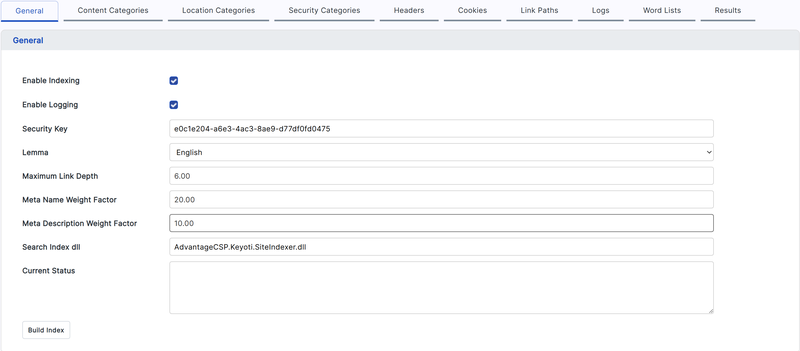
- Open the Search configuration screen and select the General tab.
- Tick Enable Indexing.
- Tick Enable Logging. Leave logging on for the first few builds — it is the only way to diagnose a build that does not produce the results you expect. You can switch it off later.
- Set Maximum Link Depth. This limits how many links deep the crawler travels from the home page. Start conservatively and increase it if pages are missing.
- Choose the Lemma language to match the language of the content being indexed.
- Save the configuration.
- Click Build Index.
The Current Status box on the General tab reports progress while a build is running. A build on a large site takes time; you can navigate away and return to the screen to check on it.
Verifying the Build
Once the build reports as complete, check it in this order:
- Open the Results tab and review Index Results. This lists the pages that were indexed. If it is empty or much shorter than your site, the crawler did not reach your content.
- Check Not Found (404). Entries here are broken links on your site. They do not stop the index from working, but they are worth fixing.
- Check Redirects for URLs that moved. A large number of redirects can waste crawl depth.
- Run a search on the live site and confirm results come back.
Common First-Build Problems
|
Symptom |
Where to look |
|---|---|
|
Almost nothing indexed |
Maximum Link Depth may be too low, or the crawler cannot reach the site. Check the Logs tab. |
|
A whole area of the site is missing |
Check the exclude-path list on the Link Paths tab — a broad path entry can remove more than intended. See Controlling Which Pages Are Indexed. |
|
Pages behind a login are missing |
The crawler is anonymous unless configured otherwise. See HTTP Headers and Cookies. |
|
Pages are indexed but text is missing from them |
Content may sit inside an ignore block in the template. See Controlling Indexing from Page Markup. |
|
Common words return no results |
They may be on the stop list. See Custom Words and Stop Lists. |
Forcing a Complete Rebuild
BWA reuses the previous run's results to avoid redoing work. If you have made a change that should affect every page — editing the stop list, for example — use Clear on the Index Results tab. That discards the previous run's record so the next build starts from scratch.