


Enabling API Requests
Enabling access to the API requires 2 steps.
- Register the API for usage in the Global.asax file.
- Register a BusinessObject for access inside the BWA admin.
Global.asax
To allow the system to access the API, you must add the registration to the "Application Start".
If secure access is required, you must configure a custom handler to process the security. There is a sample handler included by default in the project.
- Public Access -> AdvantageCSP.API.WebApiConfig.Register(GlobalConfiguration.Configuration, null);
- Secure Access -> AdvantageCSP.API.WebApiConfig.Register(GlobalConfiguration.Configuration, new SecureContentControllerHandler());
| C# |
 Copy
Copy
|
|---|---|
void Application_Start(object sender, EventArgs e) { AdvantageCSP.API.WebApiConfig.Register(GlobalConfiguration.Configuration, null); //** Uncomment to add to route for API. Create your own Handler for authentication or use NULL for public read. Sample for reference only. ** //AdvantageCSP.API.WebApiConfig.Register(GlobalConfiguration.Configuration, new AdvantageCSP.WebAPI.Handler.SecureContentControllerHandler()); } |
|
Register a Data Entity BusinessObject
For a data entity to be accessible, it must be configured in the API screen inside the admin.
Navigate to Domain Management -> Configuration Settings -> System -> API
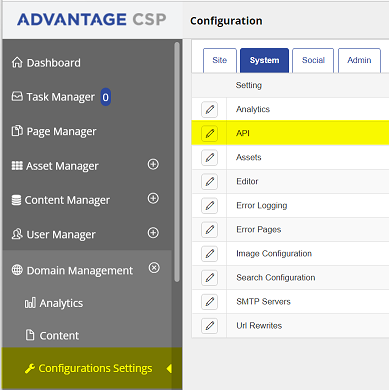
Add the API Entry

- API Name -> The name of the API object use by the consumer.
- Object Name -> The BusinessObject.
- Use Cache -> Enables Caching of database queries.
- Cache Minutes -> How long cache results should be held before refreshing.
- Permissions -> What actions are allowed on this entry.